


+91-9995829239

aravindjjofficial@gmail.com

Get In Touch
Have a project in mind or just want to say hi? I’d love to hear from you!

Driving Efficiency Through Tailored Regional Sales Strategies
LeadSquared
Senior UI/UX Designer
Overview
In 2022, the Sales Territory Management Web Application was redesigned to improve lead assignment accuracy and reduce operational overhead for high-velocity sales teams. Previously, manual processes often led to territory overlaps, inconsistent distribution, and limited visibility for management. The updated solution transformed these workflows into a visual, automation-driven experience that streamlined lead management and enhanced operational transparency.
Role
Senior UI/UX Designer
Duration
6 Months
Platform
Web
Impact
+10% sales team productivity
The Challenge

Inconsistent workflows across teams
Different regions followed their own territory and lead management processes.

No visual mapping for territories
Managers couldn’t see or define territories clearly, leading to confusion and overlap.

Manual, error-prone lead distribution
Assigning leads took too much time and frequently resulted in misallocation.

Lack of insights for managers
Managers had no centralized view of territory performance or workload distribution.

Overlapping zones causing confusion
Multiple reps often covered the same area, creating conflicts and missed opportunities.
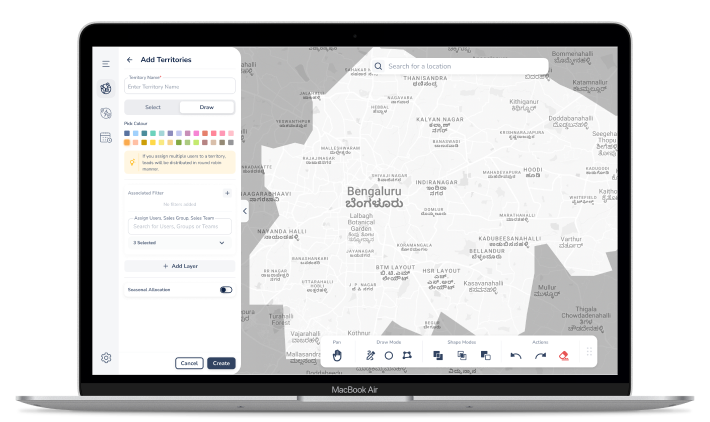
Leading the end-to-end design, the role focused on UX strategy, information architecture, and high-fidelity prototypes featuring map-based interactions. This involved establishing a design system, collaborating closely with Product Manager and Engineering, and mentoring junior designers to ensure high-quality execution throughout the project.
My Role

Discovery
The process began with a deep dive into the problem space through heuristic evaluations and competitive analysis. By developing user personas and mapping workflows, the foundational user needs and journey were clearly defined to guide the strategy.

Design
The solution took shape through iterative concept explorations, which were refined into detailed wireframes and interaction models. A dedicated design system was established to provide a consistent framework for the high-fidelity UI and functional prototypes.

Delivery
The final stage focused on refining the experience through feedback-driven iterations. This ensured a smooth transition during engineering handoff and provided the necessary support through the release to guarantee a high-quality launch.
Process
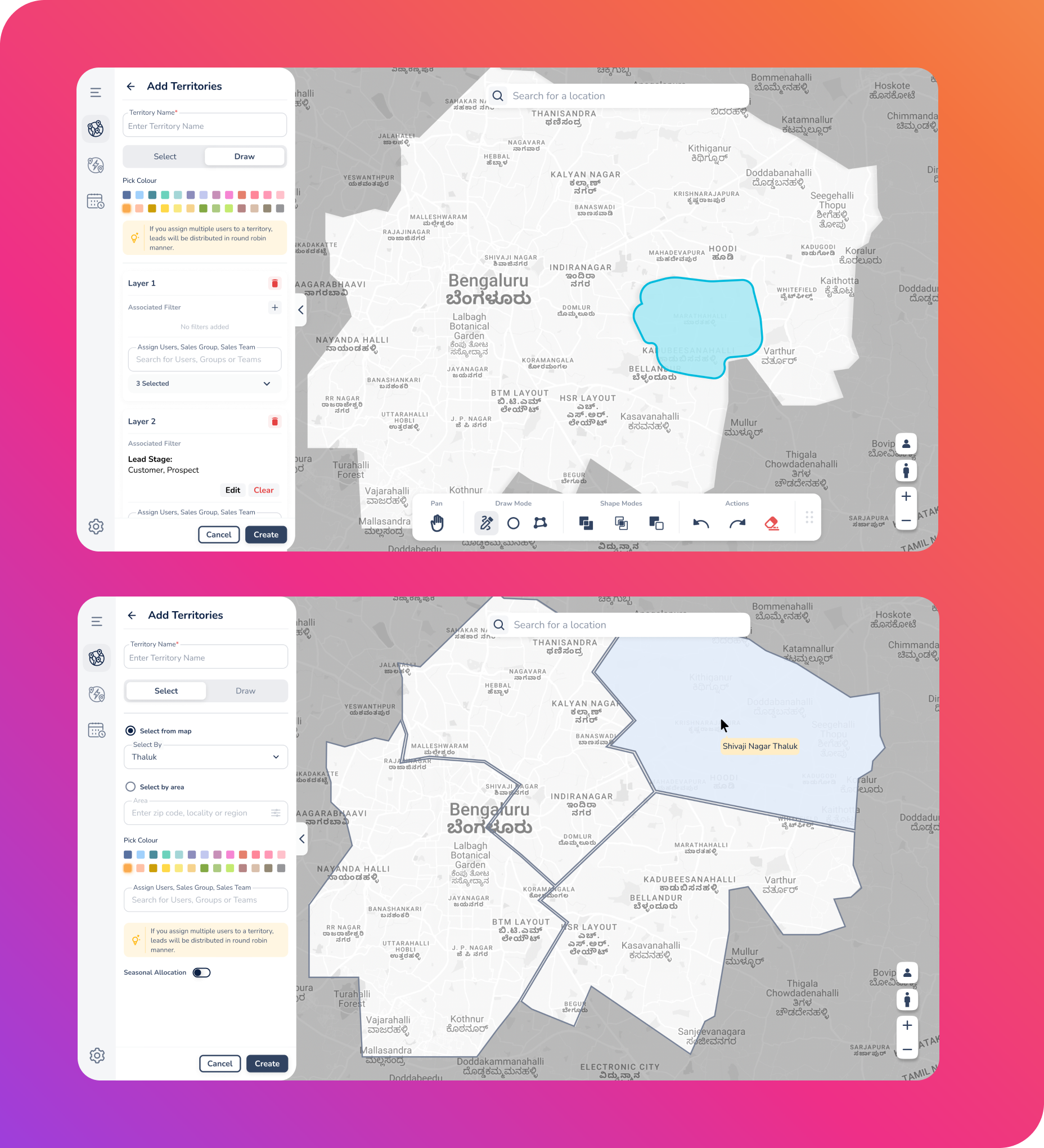
Map-Based Territory Creation
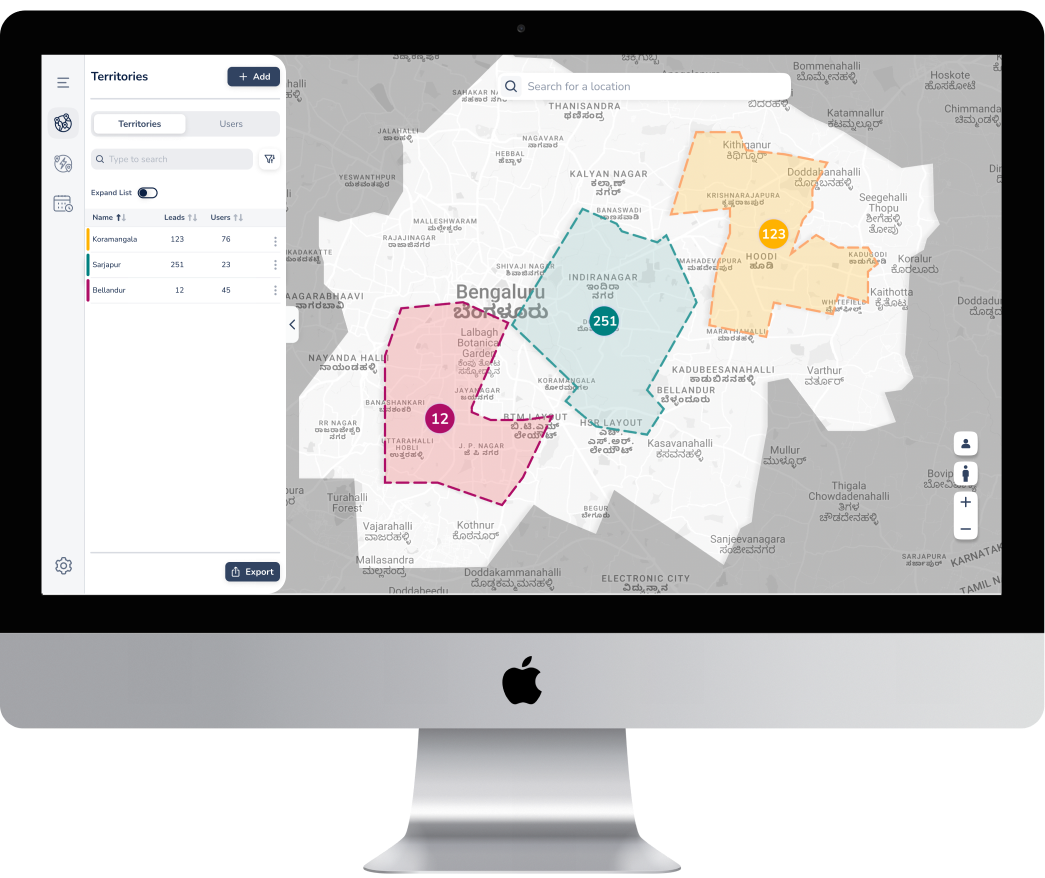
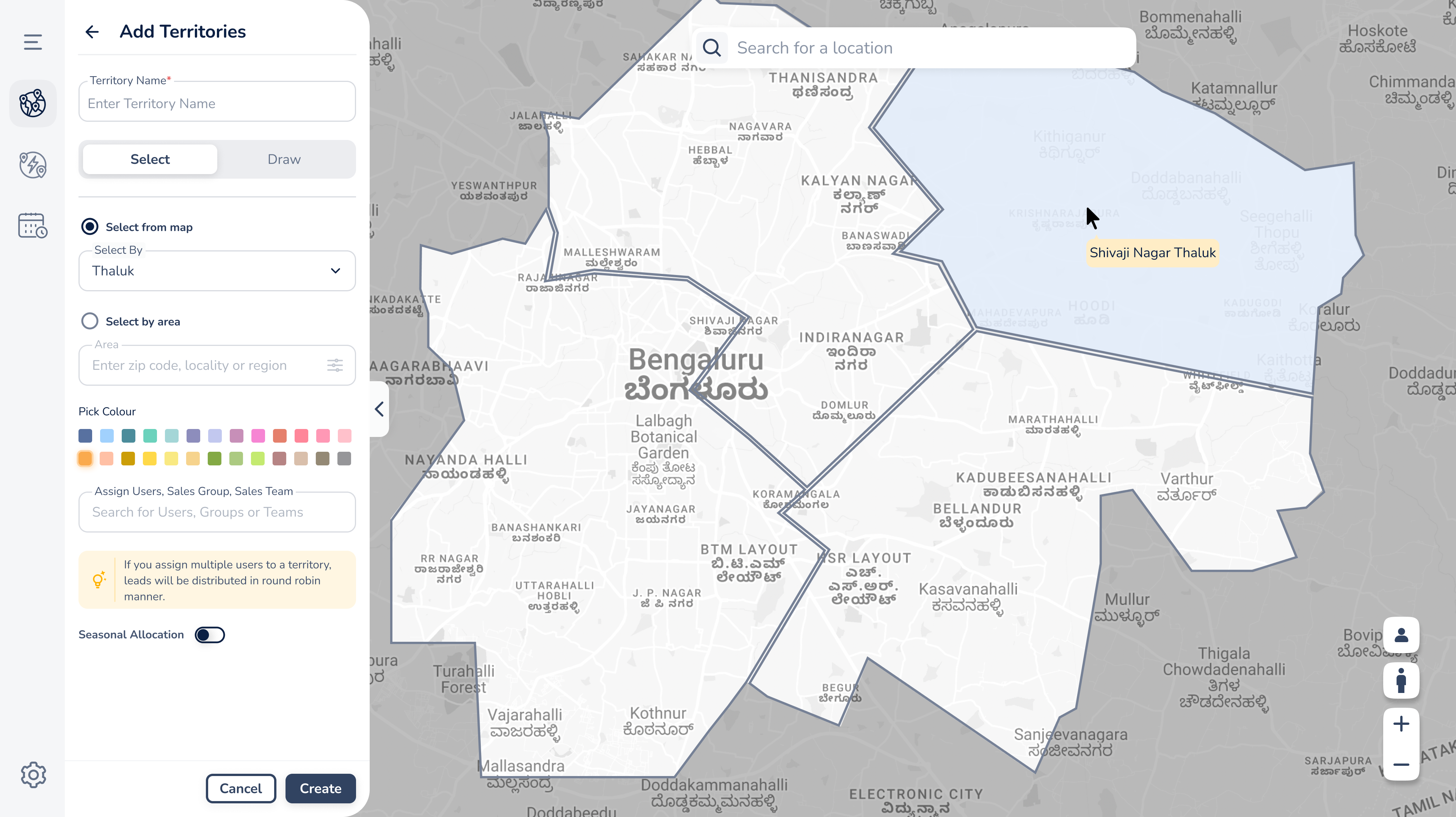
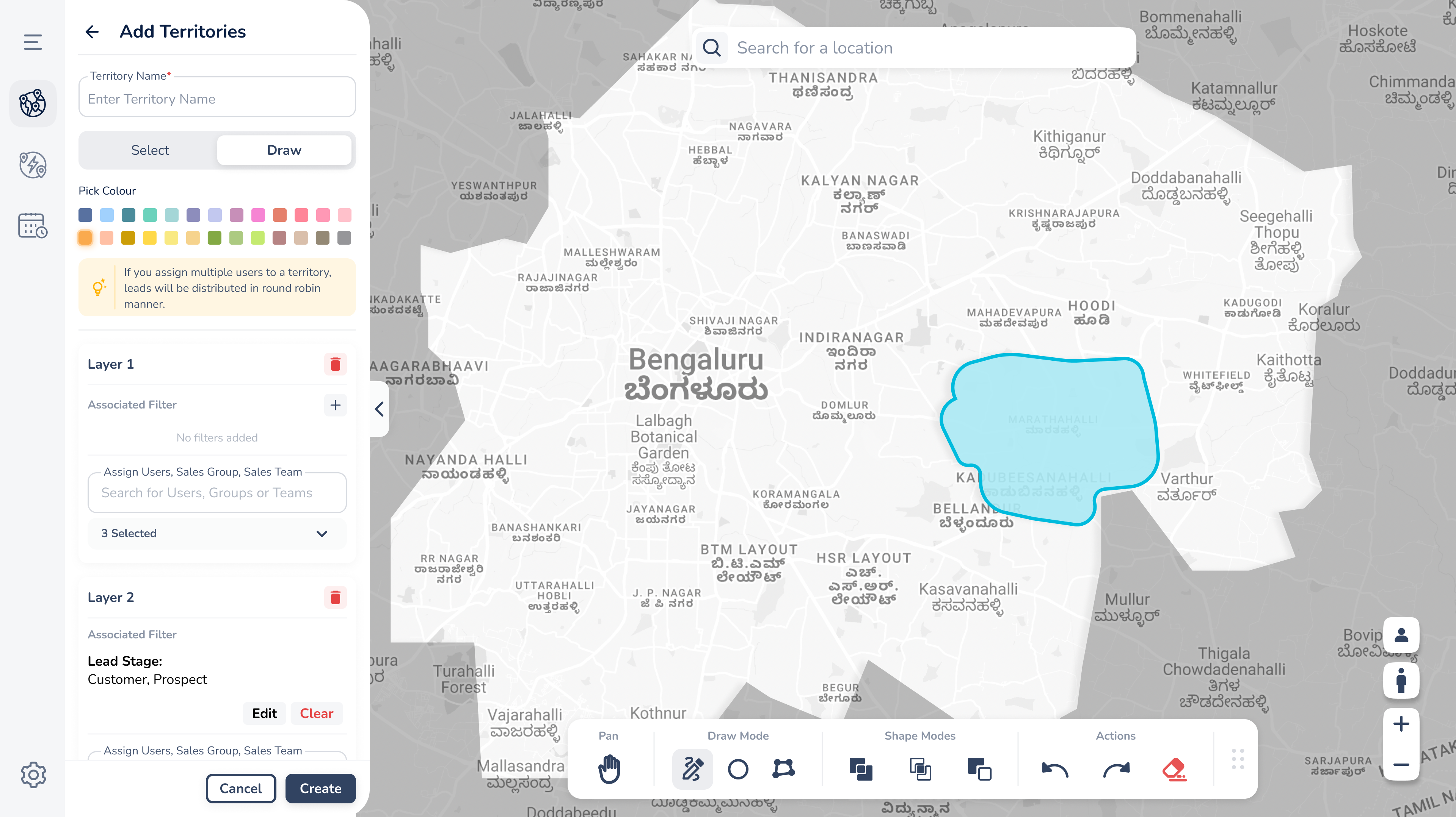
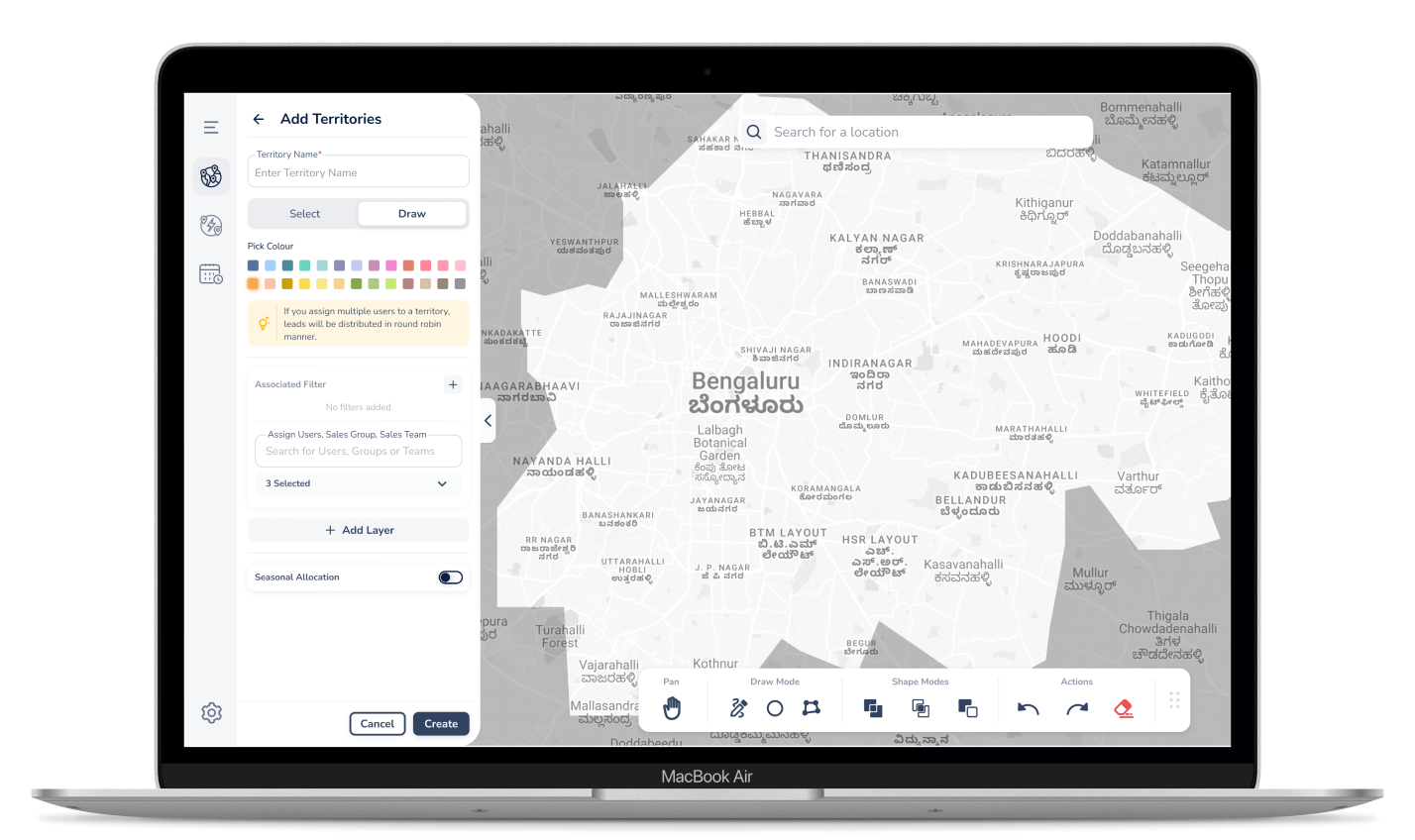
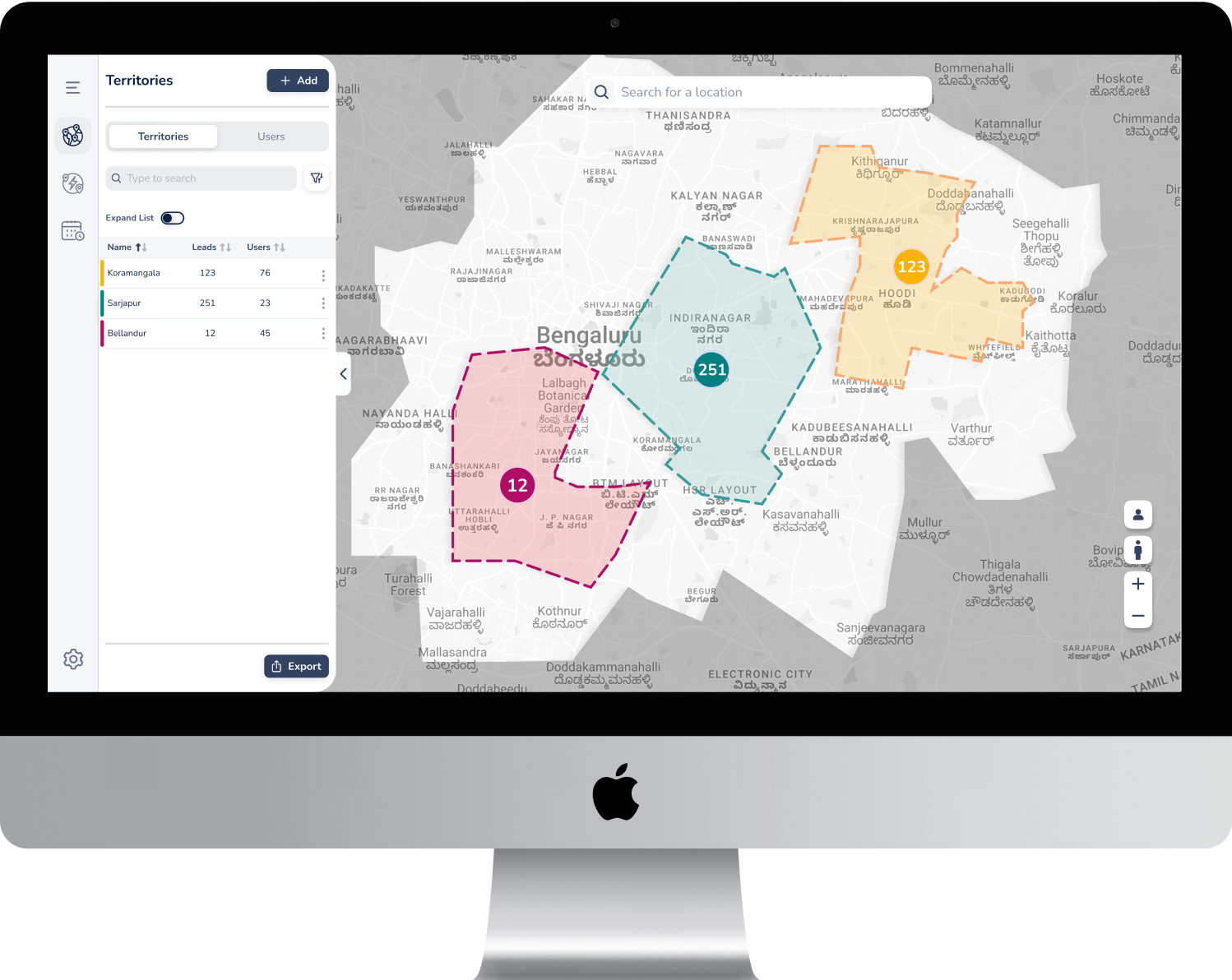
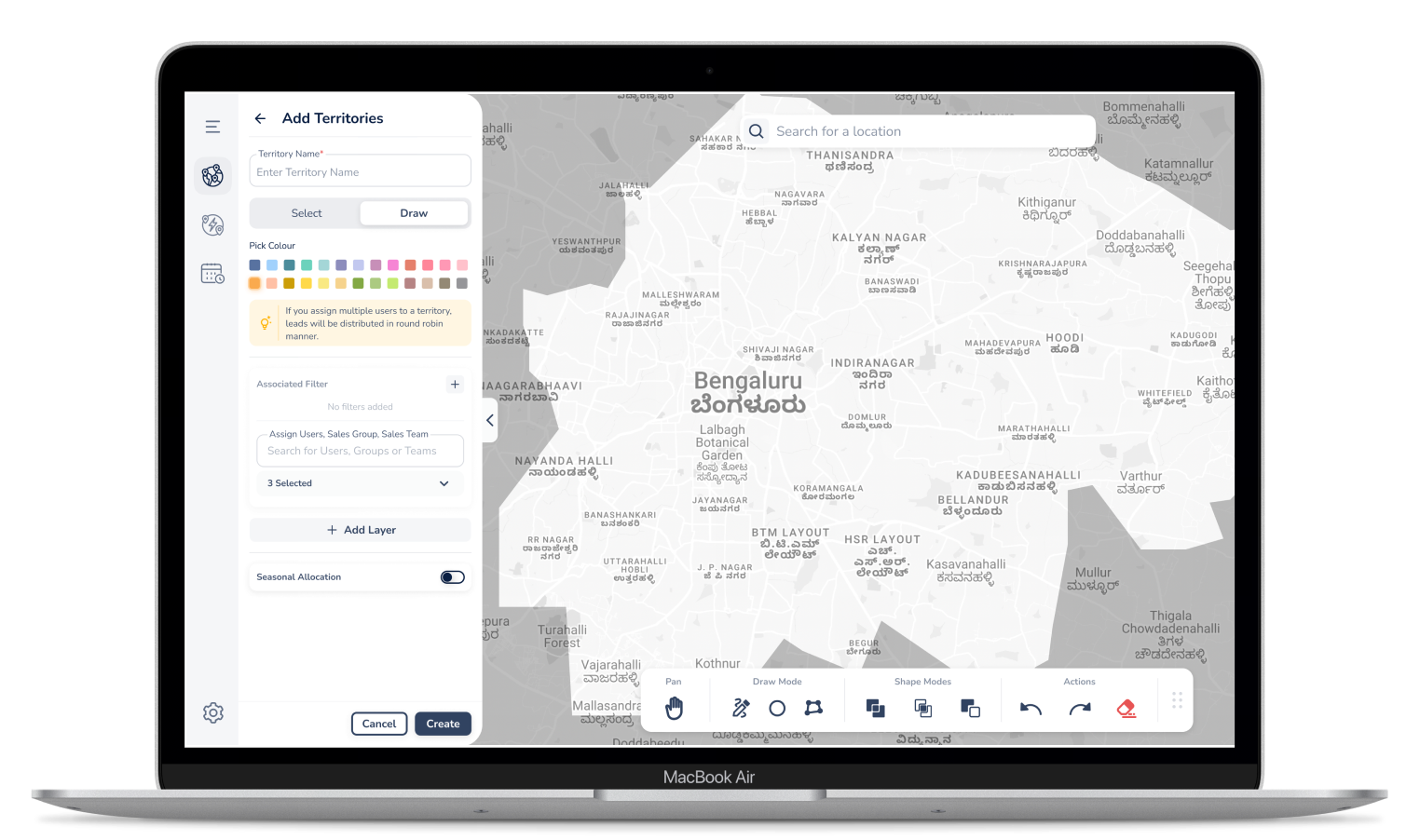
Users can define their sales areas using versatile tools such as freehand drawing, polygon shapes, or by selecting predefined regions. Once created, these boundaries remain fully editable to accommodate shifting business needs. To ensure clarity when managing multiple areas, the system utilizes a color-coding feature to visually distinguish different territories on the map.
Key Features

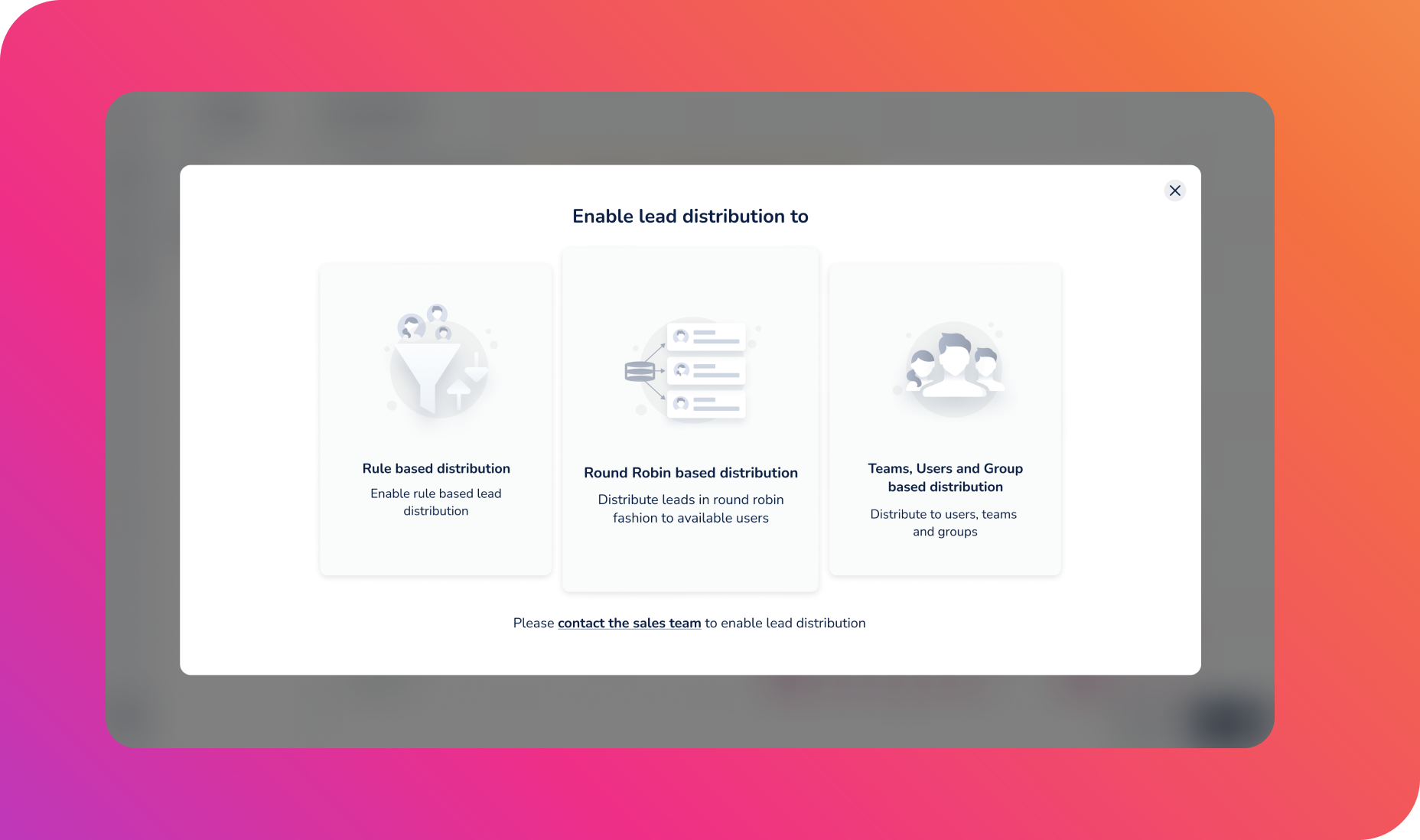
Automated Lead Assignment
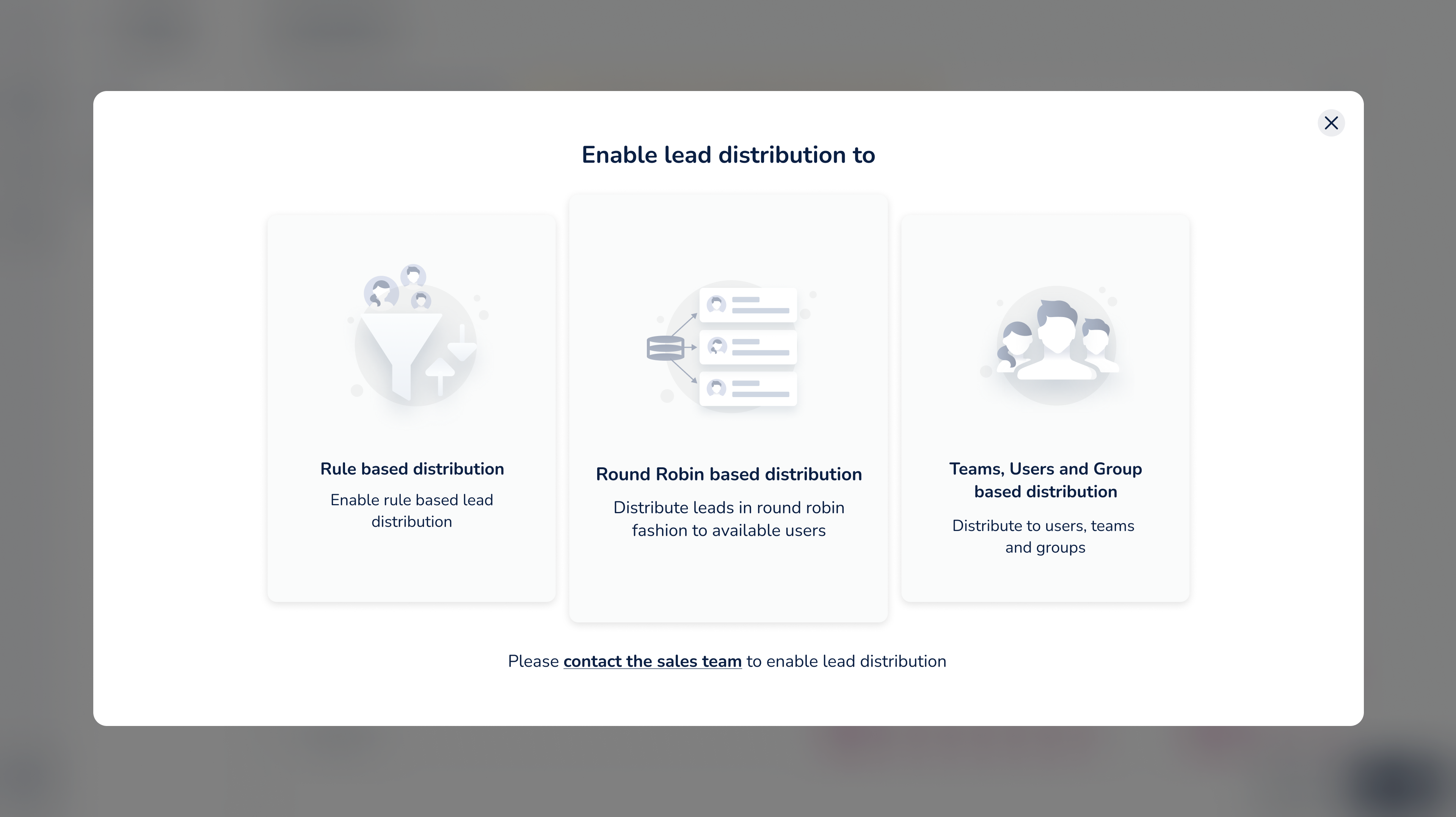
The platform streamlines operations by distributing leads based on specific territory rules and custom criteria. It ensures a fair workload among team members by employing round-robin and load-balancing logic. Additionally, managers can set priority levels to ensure that high-value leads are handled by the right reps according to their specific business requirements.

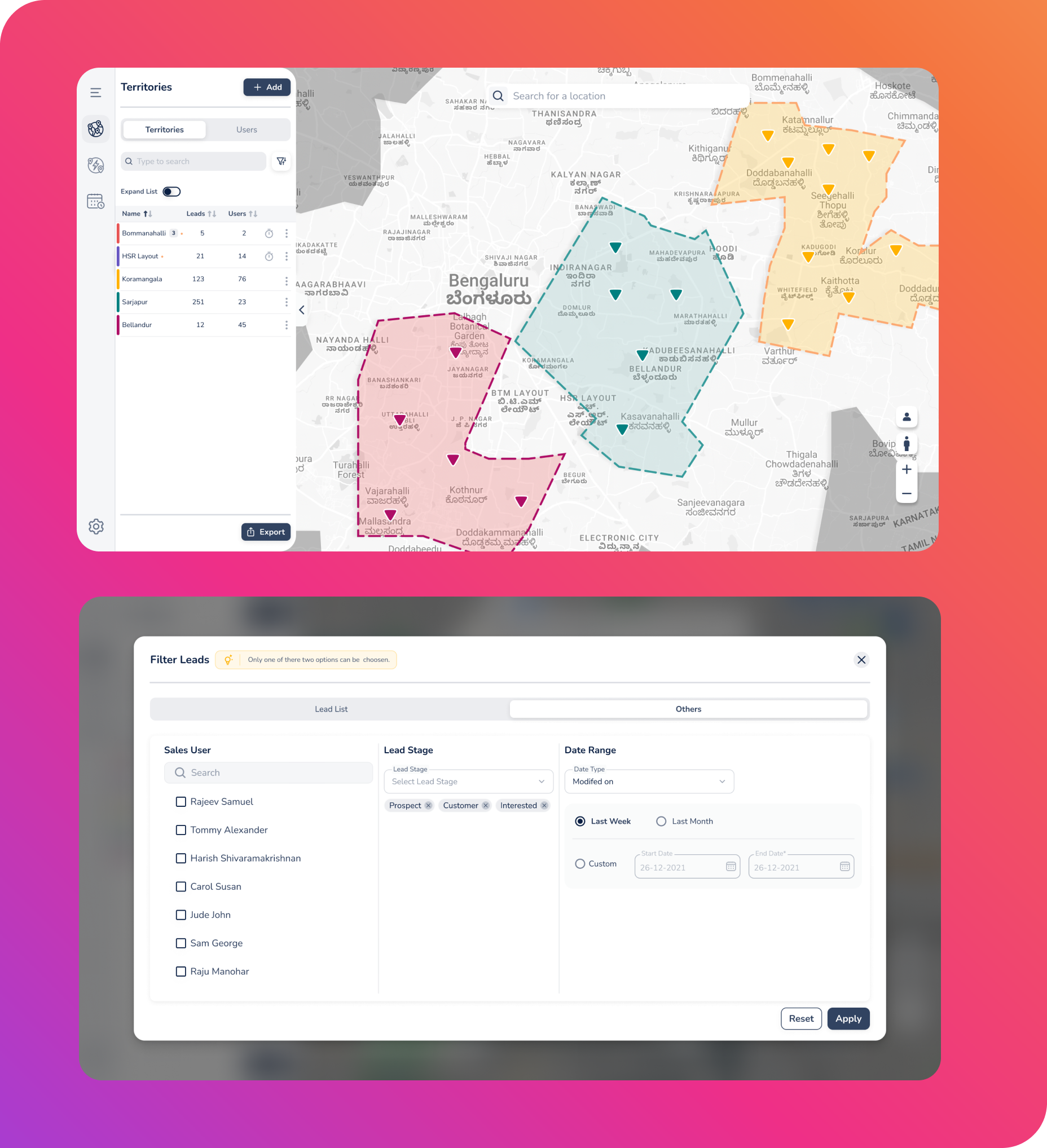
Territory Insights
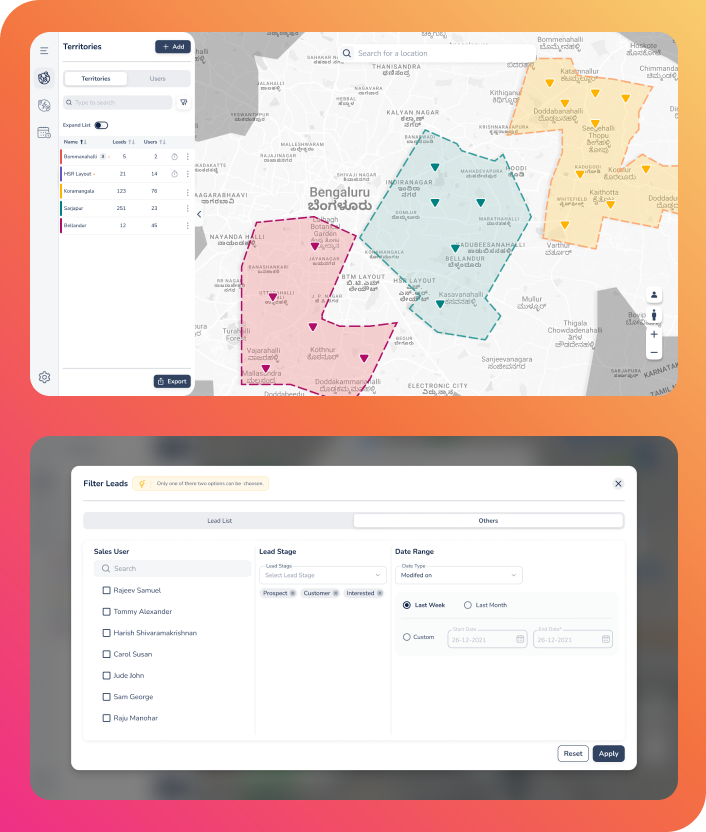
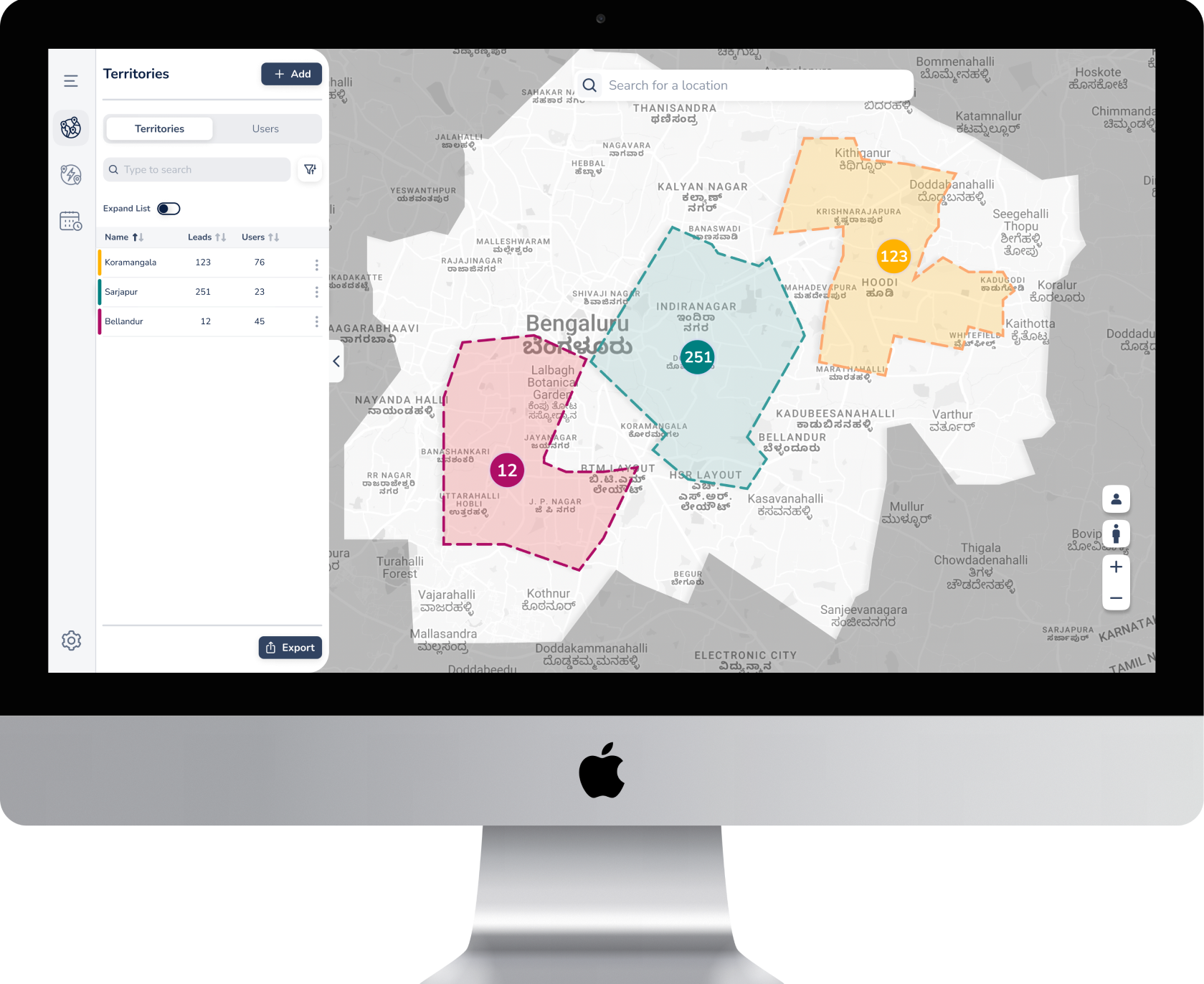
This feature provides comprehensive data on how leads are distributed across various regions. It allows managers to track rep assignments and monitor overall performance metrics in real-time. By analyzing these insights, businesses can make data-driven decisions to optimize their sales strategies and territory coverage.
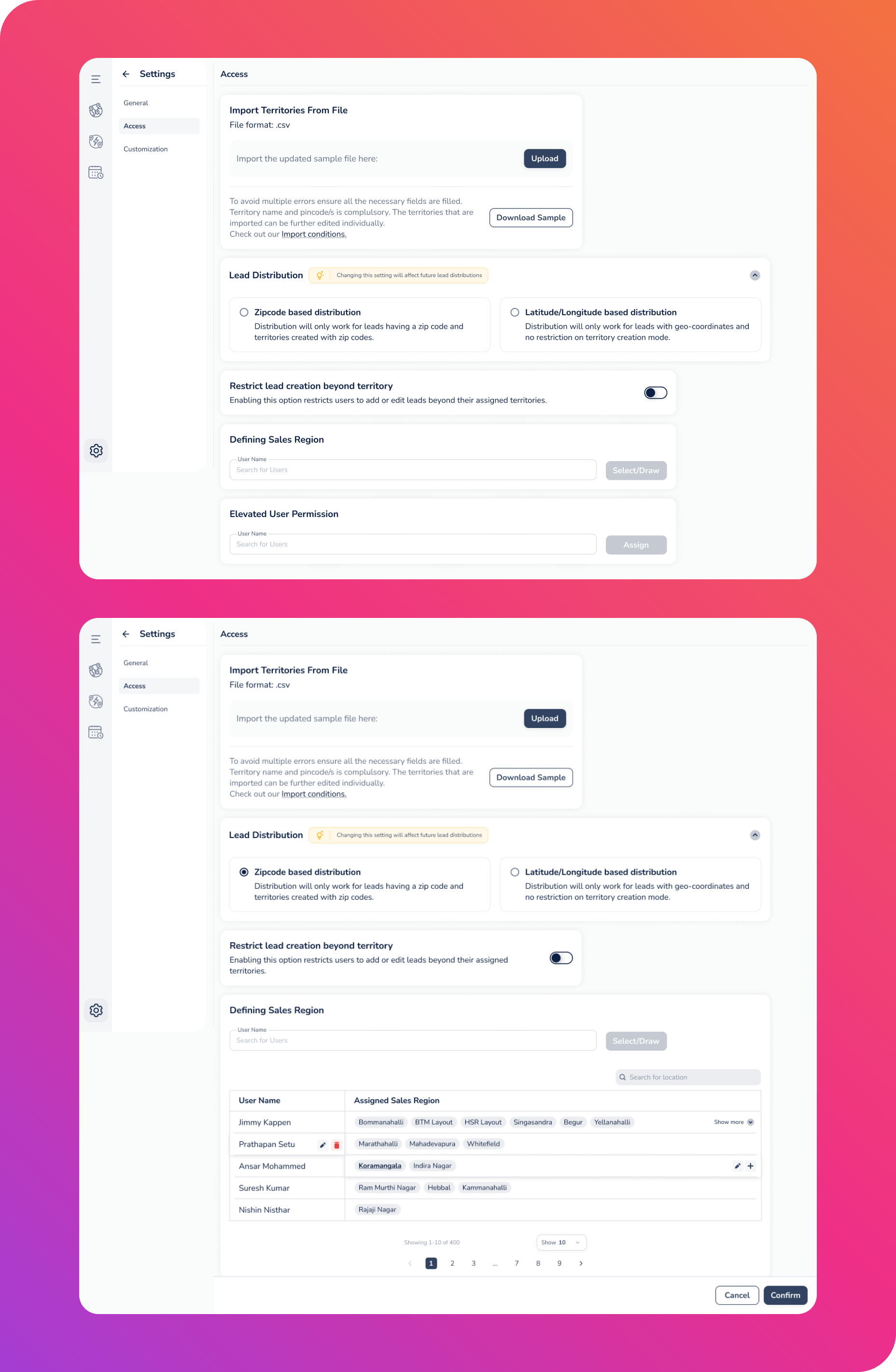
Role-Based Access
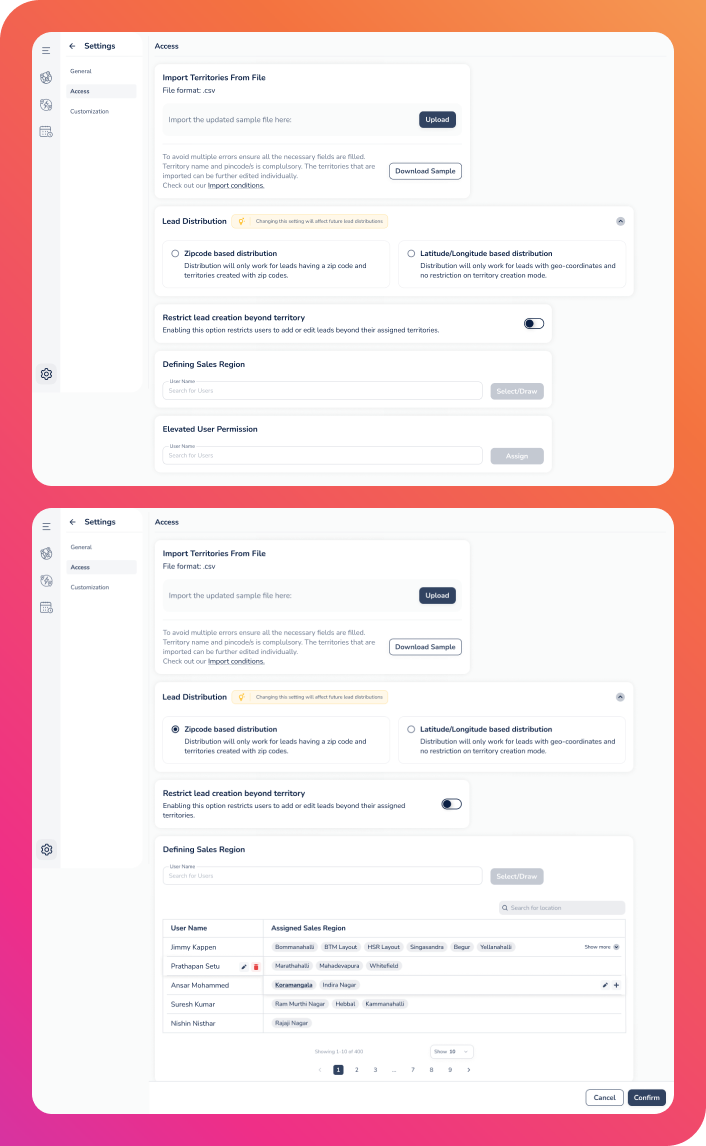
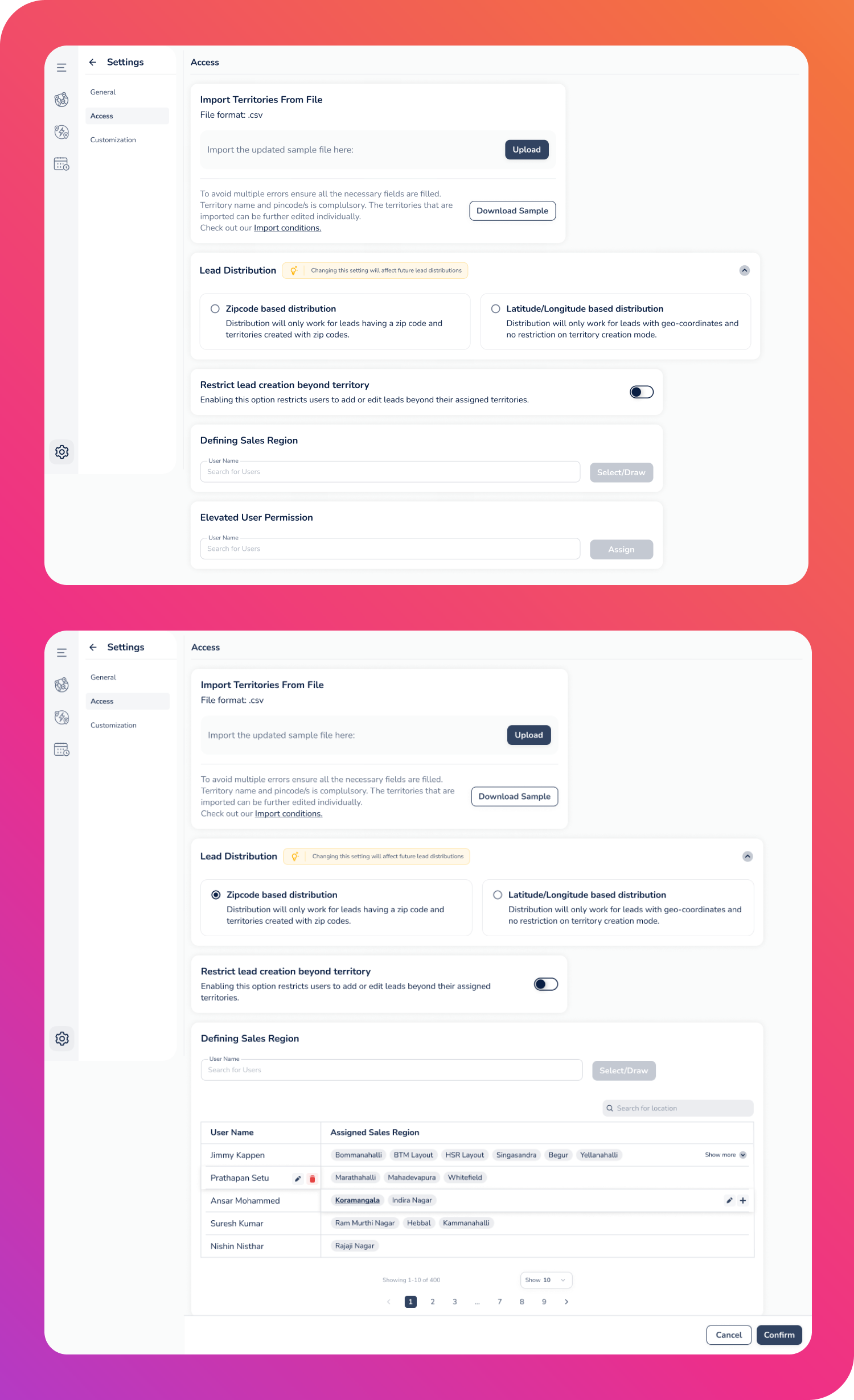
Security and relevance are maintained through a tiered access system where admins, managers, and sales representatives each receive tailored dashboards. This ensures that every user has the specific permissions and tools they need to perform their role effectively without accessing unnecessary or sensitive data.

10% improvement in productivity

Faster onboarding due to intuitive UI

Reduced lead leakage and overlap

Better clarity across regions
Results
Designing a map-based territory management tool highlighted the need for intuitive interaction patterns and flexibility to support diverse real-world sales workflows. Early collaboration with engineering helped validate complex features and reduce rework. We also learned that users trust automation more when they understand and can control it, so transparency became a key design principle. Structuring the product into clear, modular sections and maintaining strong visual hierarchy further improved navigation and decision-making for managers.
- Visual workflows require intuitive, real-world interaction patterns.
- Early engineering involvement prevents rework and ensures feasibility.
- Flexibility is crucial due to varied sales processes across regions.
- Transparent automation increases user confidence and adoption.
- Clear modular architecture and hierarchy significantly enhance usability.
Takeaways

Experience
Works
Blogs
Testimonials


Get In Touch
Have a project in mind or just want to say hi? I’d love to hear from you!
+91-9995829239
aravindjjofficial@gmail.com
Driving Efficiency Through Tailored Regional Sales Strategies
LeadSquared
Senior UI/UX Designer
Overview
In 2022, the Sales Territory Management Web Application was redesigned to improve lead assignment accuracy and reduce operational overhead for high-velocity sales teams. Previously, manual processes often led to territory overlaps, inconsistent distribution, and limited visibility for management. The updated solution transformed these workflows into a visual, automation-driven experience that streamlined lead management and enhanced operational transparency.
Role
Senior UI/UX Designer
Duration
6 Months
Platform
Web
Impact
+10% sales team productivity
The Challenge
Inconsistent workflows across teams
Different regions followed their own territory and lead management processes.
No visual mapping for territories
Managers couldn’t see or define territories clearly, leading to confusion and overlap.
Manual, error-prone lead distribution
Assigning leads took too much time and frequently resulted in misallocation.
Lack of insights for managers
Managers had no centralized view of territory performance or workload distribution.
Overlapping zones causing confusion
Multiple reps often covered the same area, creating conflicts and missed opportunities.
My Role
Leading the end-to-end design, the role focused on UX strategy, information architecture, and high-fidelity prototypes featuring map-based interactions. This involved establishing a design system, collaborating closely with Product Manager and Engineering, and mentoring junior designers to ensure high-quality execution throughout the project.
Process
Discovery
The process began with a deep dive into the problem space through heuristic evaluations and competitive analysis. By developing user personas and mapping workflows, the foundational user needs and journey were clearly defined to guide the strategy.
Design
The solution took shape through iterative concept explorations, which were refined into detailed wireframes and interaction models. A dedicated design system was established to provide a consistent framework for the high-fidelity UI and functional prototypes.
Delivery
The final stage focused on refining the experience through feedback-driven iterations. This ensured a smooth transition during engineering handoff and provided the necessary support through the release to guarantee a high-quality launch.
Key Features
Map-Based Territory Creation
Users can define their sales areas using versatile tools such as freehand drawing, polygon shapes, or by selecting predefined regions. Once created, these boundaries remain fully editable to accommodate shifting business needs. To ensure clarity when managing multiple areas, the system utilizes a color-coding feature to visually distinguish different territories on the map.

Automated Lead Assignment
The platform streamlines operations by distributing leads based on specific territory rules and custom criteria. It ensures a fair workload among team members by employing round-robin and load-balancing logic. Additionally, managers can set priority levels to ensure that high-value leads are handled by the right reps according to their specific business requirements.

Territory Insights
This feature provides comprehensive data on how leads are distributed across various regions. It allows managers to track rep assignments and monitor overall performance metrics in real-time. By analyzing these insights, businesses can make data-driven decisions to optimize their sales strategies and territory coverage.

Role-Based Access
Security and relevance are maintained through a tiered access system where admins, managers, and sales representatives each receive tailored dashboards. This ensures that every user has the specific permissions and tools they need to perform their role effectively without accessing unnecessary or sensitive data.
10% improvement in productivity
Faster onboarding due to intuitive UI

Reduced lead leakage and overlap
Better clarity across regions
Results
Takeaways
Designing a map-based territory management tool highlighted the need for intuitive interaction patterns and flexibility to support diverse real-world sales workflows. Early collaboration with engineering helped validate complex features and reduce rework. We also learned that users trust automation more when they understand and can control it, so transparency became a key design principle. Structuring the product into clear, modular sections and maintaining strong visual hierarchy further improved navigation and decision-making for managers.
- Visual workflows require intuitive, real-world interaction patterns.
- Early engineering involvement prevents rework and ensures feasibility.
- Flexibility is crucial due to varied sales processes across regions.
- Transparent automation increases user confidence and adoption.
- Clear modular architecture and hierarchy significantly enhance usability.
Experience
Works
Blogs
Testimonials


Get In Touch
Have a project in mind or just want to say hi? I’d love to hear from you!
+91-9995829239
aravindjjofficial@gmail.com
Driving Efficiency Through Tailored Regional Sales Strategies
LeadSquared
Senior UI/UX Designer
Overview
In 2022, the Sales Territory Management Web Application was redesigned to improve lead assignment accuracy and reduce operational overhead for high-velocity sales teams. Previously, manual processes often led to territory overlaps, inconsistent distribution, and limited visibility for management. The updated solution transformed these workflows into a visual, automation-driven experience that streamlined lead management and enhanced operational transparency.
Role
Senior UI/UX Designer
Duration
6 Months
Platform
Web
Impact
+10% sales team productivity
The Challenge
Inconsistent workflows across teams
Different regions followed their own territory and lead management processes.
No visual mapping for territories
Managers couldn’t see or define territories clearly, leading to confusion and overlap.
Manual, error-prone lead distribution
Assigning leads took too much time and frequently resulted in misallocation.
Lack of insights for managers
Managers had no centralized view of territory performance or workload distribution.
Overlapping zones causing confusion
Multiple reps often covered the same area, creating conflicts and missed opportunities.
My Role
Leading the end-to-end design, the role focused on UX strategy, information architecture, and high-fidelity prototypes featuring map-based interactions. This involved establishing a design system, collaborating closely with Product Manager and Engineering, and mentoring junior designers to ensure high-quality execution throughout the project.
Process
Discovery
The process began with a deep dive into the problem space through heuristic evaluations and competitive analysis. By developing user personas and mapping workflows, the foundational user needs and journey were clearly defined to guide the strategy.
Design
The solution took shape through iterative concept explorations, which were refined into detailed wireframes and interaction models. A dedicated design system was established to provide a consistent framework for the high-fidelity UI and functional prototypes.
Delivery
The final stage focused on refining the experience through feedback-driven iterations. This ensured a smooth transition during engineering handoff and provided the necessary support through the release to guarantee a high-quality launch.
Key Features
Map-Based Territory Creation
Users can define their sales areas using versatile tools such as freehand drawing, polygon shapes, or by selecting predefined regions. Once created, these boundaries remain fully editable to accommodate shifting business needs. To ensure clarity when managing multiple areas, the system utilizes a color-coding feature to visually distinguish different territories on the map.
Automated Lead Assignment
The platform streamlines operations by distributing leads based on specific territory rules and custom criteria. It ensures a fair workload among team members by employing round-robin and load-balancing logic. Additionally, managers can set priority levels to ensure that high-value leads are handled by the right reps according to their specific business requirements.
Territory Insights
This feature provides comprehensive data on how leads are distributed across various regions. It allows managers to track rep assignments and monitor overall performance metrics in real-time. By analyzing these insights, businesses can make data-driven decisions to optimize their sales strategies and territory coverage.
Role-Based Access
Security and relevance are maintained through a tiered access system where admins, managers, and sales representatives each receive tailored dashboards. This ensures that every user has the specific permissions and tools they need to perform their role effectively without accessing unnecessary or sensitive data.
10% improvement in productivity
Faster onboarding due to intuitive UI
Reduced lead leakage and overlap
Better clarity across regions
Results
Takeaways
Designing a map-based territory management tool highlighted the need for intuitive interaction patterns and flexibility to support diverse real-world sales workflows. Early collaboration with engineering helped validate complex features and reduce rework. We also learned that users trust automation more when they understand and can control it, so transparency became a key design principle. Structuring the product into clear, modular sections and maintaining strong visual hierarchy further improved navigation and decision-making for managers.
- Visual workflows require intuitive, real-world interaction patterns.
- Early engineering involvement prevents rework and ensures feasibility.
- Flexibility is crucial due to varied sales processes across regions.
- Transparent automation increases user confidence and adoption.
- Clear modular architecture and hierarchy significantly enhance usability.